Invite your team and choose their role
On Pro, invite up to 2 people from Settings → Team as a Member (adds and edits records) or an Admin (also manages settings, team and billing).
Bring in a bookkeeper, a partner or an assistant. Everyone signs in with their own email and sees the same business.
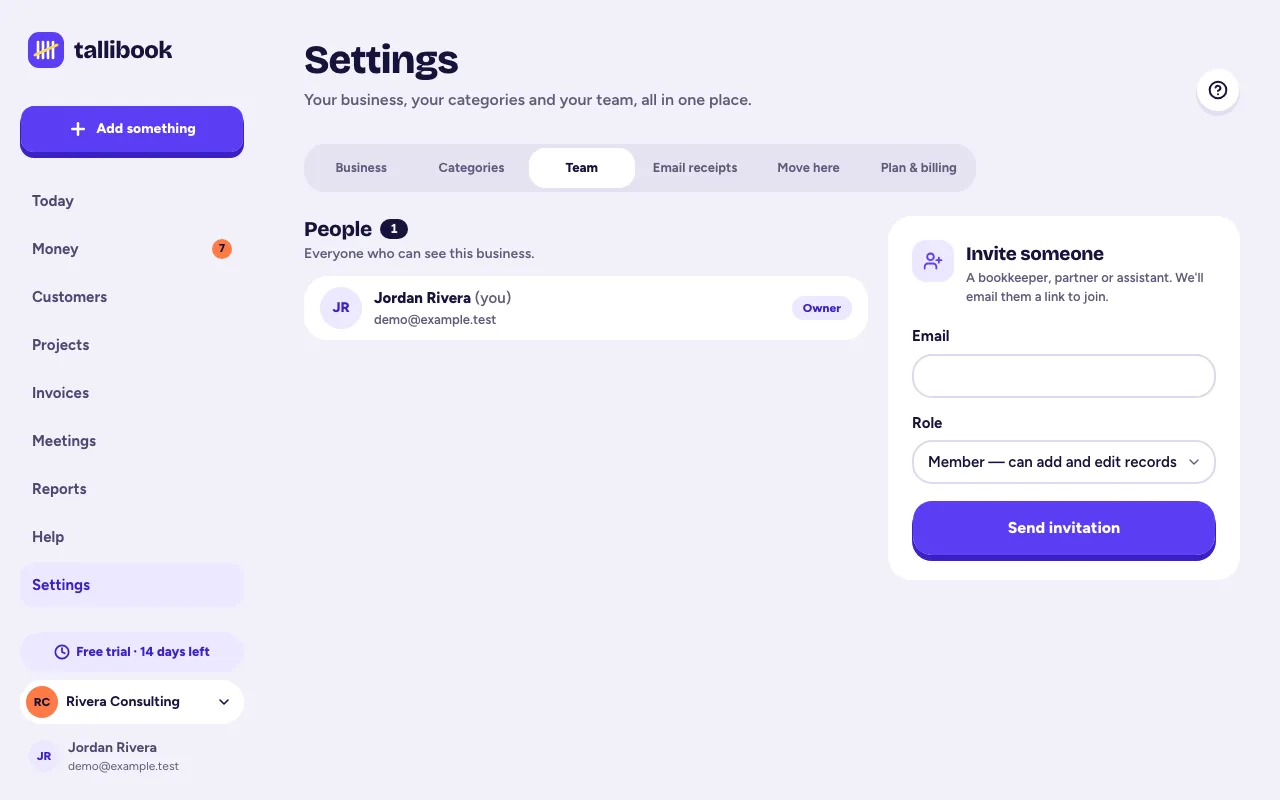
Invite someone
Owners and admins can invite people.
- Step 1: Go to Settings → Team (on a phone: More → Team members).
- Step 2: Under Invite someone, type their Email.
- Step 3: Pick a Role: Member or Admin.
- Step 4: Tap Send invitation.
They get an email with an Accept invitation button. They sign in, or create an account with that same email, and tap to join. Until then they're listed under Waiting to join, where you can cancel the invitation with the ×. If an invitation link stops working, cancel it and send a new one.
How many people
Pro includes 3 people, you included. Pending invitations count too. Starter and Solo are for one person. If you move to a smaller plan, people already on the team keep their access; you just can't invite more.
What each role can do
- Owner: the person who set up the business. Can do everything.
- Admin: can do everything the owner can, including settings, the team and the plan.
- Member: can add, edit and see customers, jobs, time, expenses, receipts, trips, income and invoices, send invoices and reminders, record payments, record meetings and import statements.
Members can't:
- void invoices or remove payments,
- delete customers or jobs,
- mark vendors as 1099 contractors,
- download reports, the tax pack or the customer list,
- change the business profile, categories, the team or the plan,
- set up recurring charges, use Move to Tallibook, undo an import or manage email receipt settings,
- delete recordings or change how long audio is kept.
When a member tries one of these, Tallibook says to ask the business owner.
Removing someone
Removing a team member isn't in the app yet. Email us at hello@tallibook.com from the owner's email and we'll do it for you.
Related articles
- Plans and what each one includesStarter is $9 a month, Solo $19 and Pro $39; paying yearly gets you 2 months free, and you choose a plan in Settings → Plan & billing.
- Share your numbers with your accountantOn the Tax season pack, tap Create a link for my accountant; they get a private, read-only download link for that year that works for 30 days, no account needed.
- Why can't I change or delete this?Usually it's one of three things: your books are read-only, the feature is part of a bigger plan, or your role doesn't allow it; a few records are also protected to keep your tax records right.
Still stuck?
Email us at hello@tallibook.com and tell us what you were trying to do.