Business or personal? Sorting To review
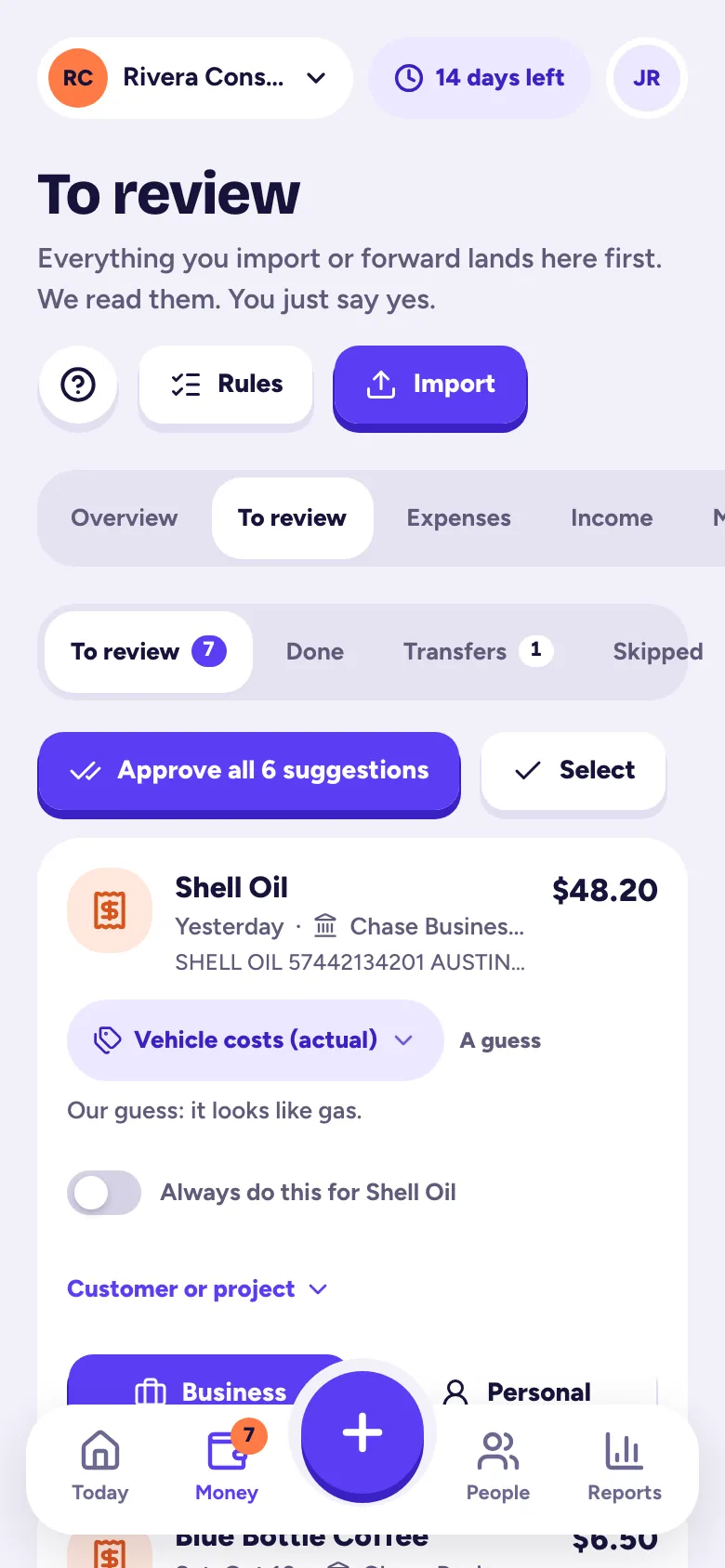
Imported and forwarded transactions wait in Money → To review; tap Business or Personal on each (or Approve all), and nothing counts until you say yes.
Everything you import or forward lands in Money → To review first: bank and card statement rows, forwarded receipt emails and bulk-uploaded receipts. We read each one and suggest a category. Nothing goes into your books until you say yes.
Decide one at a time
Each card shows who it was, the amount and the date, with our suggested category and how sure we are (Sure, Likely or A guess).
- Money out: tap Business to add it as an expense, or Personal to leave it out.
- Money in: tap Income to add it, or Not income and pick what it was: a transfer from your own account, a refund, a loan or personal money.
- Wrong category? Tap the category chip and pick another.
- For a customer or job, tap Customer or job. Money out can also be marked Bill this to the customer.
If a bank row looks like an expense you already have, we show it with a Link button. Linking attaches the two instead of adding a duplicate.
Do lots at once
- Approve all adds every item that already has a suggested category. It leaves out anything that looks personal, might be a duplicate or matches an expense you already have.
- Select lets you tick several and mark them Business or Personal together.
- On a computer, press B for business or P for personal on the card you're on.
Made a mistake? Each decision shows Undo in the message, and the Done tab keeps an Undo next to everything you decided.
Make it automatic with rules
Turn on Always do this for… before you decide, and Tallibook makes a rule: the next time that payee shows up, it's sorted the same way. Manage rules in Money → Rules: the payee text (contains, starts with or is exactly), money in or out, an optional amount range, and Business with a category or Personal. Tick Also use it on what's waiting in To review to apply a new rule right away.
The other tabs
- Transfers: moving money between your own accounts, like paying your credit card, never counts as income or an expense. We set those aside here; tap Review it if we got one wrong.
- Skipped: forwarded emails that weren't receipts (shipping notices, newsletters), with the reason.
Related articles
- Import a bank or card statementIn Money → Import, pick the account, drop in the statement your bank lets you download (CSV, Excel, OFX/QFX/QBO or PDF), check the preview and import; it all lands in To review.
- Forward email receipts to TallibookForward receipt emails to your private Tallibook address (Settings → Email receipts), or set up auto-forwarding once; each one is read and waits in To review.
- Upload a pile of receipts at onceIn Money → Import, under Upload receipts, pick up to 50 photos, PDFs or saved emails at a time; each is read and waits in To review.
- Categories and Schedule C linesEvery category maps to a line on the IRS Schedule C, so your reports come out tax-ready; add, rename or archive categories in Settings → Categories.
Still stuck?
Email us at hello@tallibook.com and tell us what you were trying to do.