Forward email receipts to Tallibook
Forward receipt emails to your private Tallibook address (Settings → Email receipts), or set up auto-forwarding once; each one is read and waits in To review.
Online purchases and bills arrive by email. Forward them to Tallibook and they file themselves: we read each one and it waits in To review with the email saved as the receipt.
Find your address
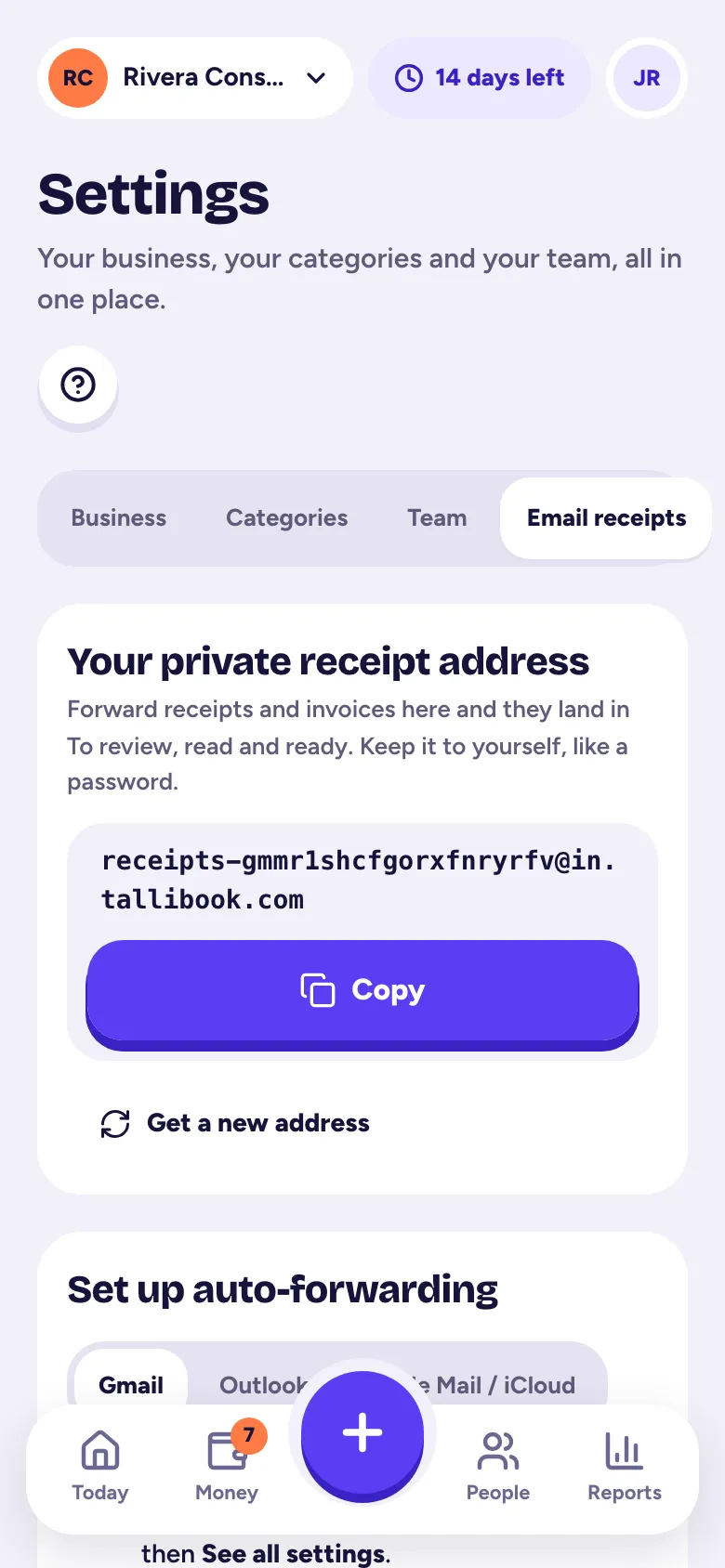
- Step 1: Go to Settings → Email receipts. (It's also under Money → Import.)
- Step 2: Under Your private receipt address, tap Copy.
Keep the address to yourself, like a password. Owners and admins can tap Get a new address if it ever gets out; the old one stops working at once.
Forward one receipt
Open the receipt email in any mail app, tap Forward, paste your Tallibook address and send. A minute later it's in Money → To review.
Forward them automatically
Under Set up auto-forwarding, pick Gmail, Outlook or Apple Mail / iCloud for step-by-step instructions. For Gmail:
- Step 1: On a computer, open Gmail, click the gear, then See all settings.
- Step 2: On Forwarding and POP/IMAP, click Add a forwarding address and paste your Tallibook address.
- Step 3: Gmail sends a confirmation code. It appears at the top of your To review page within a minute. Copy it.
- Step 4: Back in Gmail, paste the code and click Verify.
- Step 5: To forward only receipts, make a Gmail filter (search for receipt OR invoice OR "order confirmation", then Create filter and Forward it to your Tallibook address). Or forward everything: we skip what isn't a receipt.
Who can forward
Mail from your team's sign-in emails is read right away. To add another address, like your other inbox or your bookkeeper, use Add another address under Who can forward (owners and admins).
Mail from anyone else waits under Held: unknown sender in To review. Choose Approve and trust sender, Just this once or Delete.
What gets skipped
Shipping notices, newsletters and other non-receipts go to the Skipped tab with the reason. Owners and admins can tap Review anyway if we got one wrong.
Email receipts are on every plan. If something didn't show up, see An email didn't arrive.
Related articles
- Business or personal? Sorting To reviewImported and forwarded transactions wait in Money → To review; tap Business or Personal on each (or Approve all), and nothing counts until you say yes.
- An email didn't arriveCheck spam or junk first; then check the address on file, how long the link lasts, and for forwarded receipts, the Held and Skipped sections of To review.
- Snap a receiptTap + and Snap a receipt, take a photo, and we read the amount, date and store for you; check it and tap Looks good, save it.
- Upload a pile of receipts at onceIn Money → Import, under Upload receipts, pick up to 50 photos, PDFs or saved emails at a time; each is read and waits in To review.
Still stuck?
Email us at hello@tallibook.com and tell us what you were trying to do.