Get your tax season pack
Reports → Tax season pack checks what's left to fix, then downloads one .zip with your Schedule C summary, P&L, mileage log, every expense and payment, receipts and a note for your accountant.
At tax time, everything your accountant or tax software needs is one download away.
Open the tax pack
- Step 1: Go to Reports. On the Tax season pack card at the top, tap What's inside · TurboTax help. (Or tap the tax-ready ring on Today.)
- Step 2: Pick the tax year.
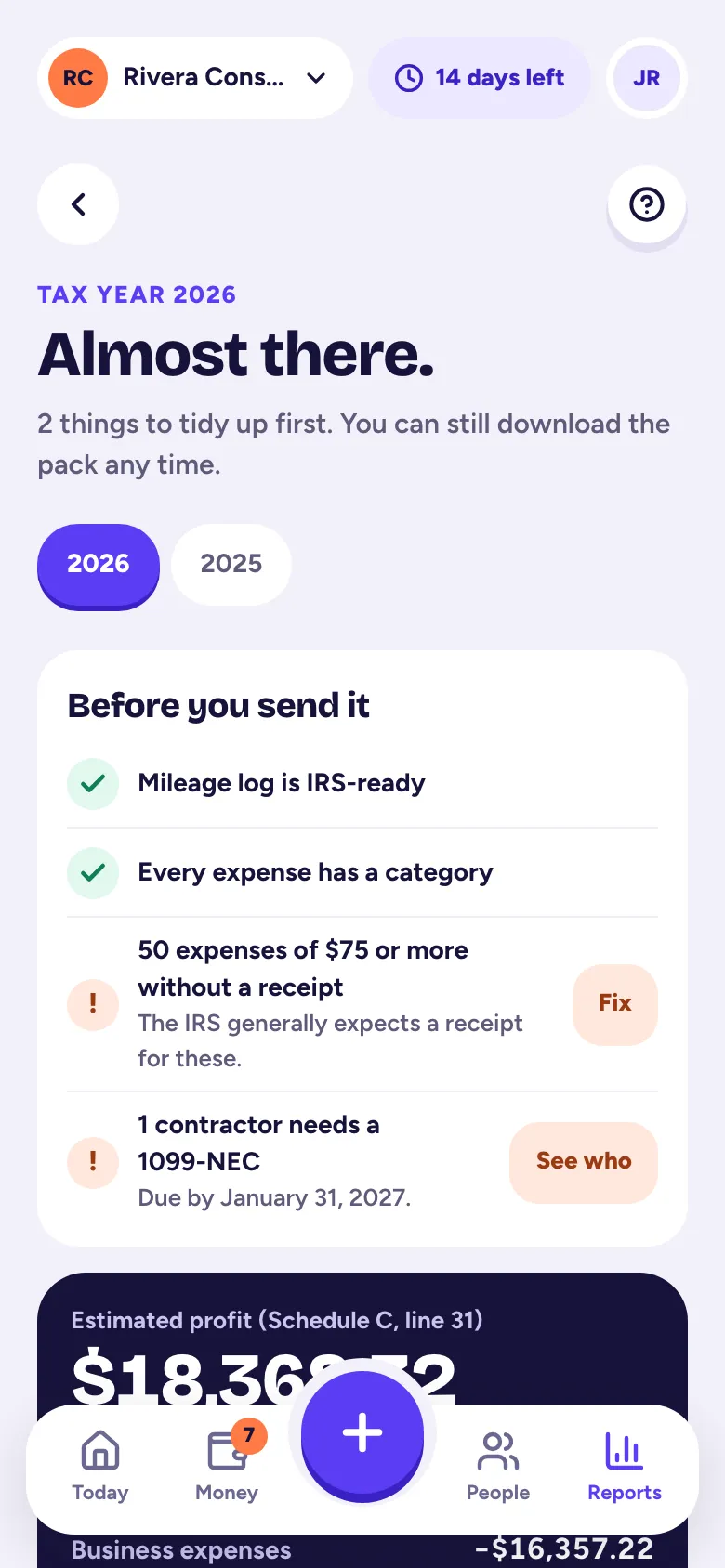
Tidy up first
Under Before you send it, Tallibook lists anything worth fixing, each with a Fix button:
- Expenses that need a category. Until they have one, they aren't on any Schedule C line.
- Expenses of $75 or more without a receipt. The IRS generally expects a receipt for these.
- Contractors who need a 1099-NEC, due by January 31 of the next year.
When there's nothing left, the page says Your tax pack is ready. You can still download it any time.
Download it
Tap Download tax pack (on the Reports card it's Download the pack (.zip)). You get a .zip with:
- Schedule C summary (PDF and spreadsheet): start here. Your numbers by Schedule C line.
- Profit & loss for the year.
- Mileage log (PDF and spreadsheet), with totals per vehicle.
- Every expense (with the matching receipt file name) and every payment you received.
- 1099 contractors and who needs a 1099-NEC.
- A receipts folder, each named by date, vendor and amount.
- A plain-English README explaining every file.
Only owners and admins can download the tax pack.
Send it to your accountant
Email the .zip, or skip the attachment and send a private link instead. See Share with your accountant. Doing your own taxes? See Use Tallibook with TurboTax.
Related articles
- Share your numbers with your accountantOn the Tax season pack, tap Create a link for my accountant; they get a private, read-only download link for that year that works for 30 days, no account needed.
- Your Schedule C summaryReports → Schedule C summary lines up your income and expenses with IRS Schedule C, line by line, with your estimated net profit; it's on every plan.
- Use Tallibook with TurboTax or other tax softwareTurboTax doesn't import Schedule C files, so you type a handful of totals from your Schedule C summary; the Tax season pack page shows where each number goes.
- Vendors and 1099 contractorsVendors are created as you type who you paid; mark people you pay for work as 1099 contractors and Tallibook tells you who needs a 1099-NEC.
Still stuck?
Email us at hello@tallibook.com and tell us what you were trying to do.